
HTML - The Head Element
HTML <head> উপাদানটি নিম্নলিখিত উপাদানগুলির জন্য একটি ধারক: <title>, <style>, <meta>, <link>, <script>, এবং <base>।
Tip:
If you are browsing this page with a phone or a tablet, you can click on the two links below to see the difference:
HTML Head Element Structure
The HTML <head> Element
<head> উপাদানটি মেটাডেটা (ডেটা সম্পর্কে ডেটা) জন্য একটি ধারক এবং এটি <html> ট্যাগ এবং <body> ট্যাগের মধ্যে স্থাপন করা হয়।
HTML মেটাডেটা হল একটি HTML নথির তথ্য। মেটাডেটা পৃষ্ঠায় প্রদর্শিত হয় না।
মেটাডেটা সাধারণত নথির শিরোনাম, অক্ষর সেট, শৈলী, প্রোগ্রাম এবং অন্যান্য মেটা তথ্য সংজ্ঞায়িত করে।
The HTML <title> Element
<title> উপাদান নথির শিরোনাম সংজ্ঞায়িত করে। শিরোনামটি শুধুমাত্র পাঠ্য হতে হবে এবং ব্রাউজারের শিরোনাম বারে বা পৃষ্ঠার একটি ট্যাবে প্রদর্শিত হবে৷
HTML নথিতে <title> উপাদান প্রয়োজন!
সার্চ ইঞ্জিন অপটিমাইজেশনের জন্য পৃষ্ঠার শিরোনামের বিষয়বস্তু খুবই গুরুত্বপূর্ণ! পৃষ্ঠার শিরোনাম সার্চ ইঞ্জিন অ্যালগরিদম দ্বারা অনুসন্ধান ফলাফলে পৃষ্ঠাগুলি তালিকাভুক্ত করার সময় ক্রম নির্ধারণ করতে ব্যবহৃত হয়।
<title> উপাদান:
- ব্রাউজার টুলবারে একটি হেডার সংজ্ঞায়িত করে
- পৃষ্ঠাটি প্রিয়তে যুক্ত হলে একটি শিরোনাম প্রদান করে
- সার্চ ইঞ্জিন ফলাফলে পৃষ্ঠার শিরোনাম প্রদর্শন করুন
সুতরাং, শিরোনাম যতটা সম্ভব নির্ভুল এবং অর্থবহ করার চেষ্টা করুন!
Example
<!DOCTYPE html>
<html>
<head>
  <title>A Meaningful Page Title</title>
</head>
<body>

The content of the document......

</body>
</html>
The HTML <style> Element
<style> উপাদানটি একটি একক HTML পৃষ্ঠার জন্য শৈলী তথ্য সংজ্ঞায়িত করতে ব্যবহৃত হয়:
Example
<style>
  body {background-color: powderblue;}
  h1 {color: red;}
  p {color: blue;}
</style>
The HTML <link> Element
<link> উপাদান বর্তমান নথি এবং একটি বহিরাগত সম্পদের মধ্যে সম্পর্ক সংজ্ঞায়িত করে।
<link> ট্যাগটি প্রায়ই বহিরাগত স্টাইল শীট লিঙ্ক করতে ব্যবহৃত হয়:
Example
<link rel="stylesheet" href="mystyle.css">Tip:
To learn all about CSS, visit our CSS Tutorial.
The HTML <meta> Element
<meta> উপাদানটি সাধারণত নথির ফন্ট, পৃষ্ঠার বিবরণ, কীওয়ার্ড, লেখক এবং ভিউপোর্ট সেটিংস নির্দিষ্ট করতে ব্যবহৃত হয়।
মেটাডেটা পৃষ্ঠায় প্রদর্শিত হয় না, তবে ব্রাউজার (কীভাবে বিষয়বস্তু প্রদর্শন বা পৃষ্ঠাটি পুনরায় লোড করতে হয়), সার্চ ইঞ্জিন (কীওয়ার্ড) এবং অন্যান্য ওয়েব পরিষেবা দ্বারা ব্যবহৃত হয়।
Examples
Example of <meta> tags:
<meta charset="UTF-8">
<meta name="description" content="Free Web tutorials">
<meta name="keywords" content="HTML, CSS, JavaScript">
<meta name="author" content="John Doe">
Setting The Viewport
একটি ভিউপোর্ট হল একটি ওয়েব পৃষ্ঠার অংশ যা একজন ব্যবহারকারী দেখতে পারে। এটি ডিভাইসের সাথে পরিবর্তিত হয় - এটি একটি কম্পিউটার স্ক্রিনের চেয়ে মোবাইল ফোনে ছোট।
You should include the following <meta> element in all your web pages:
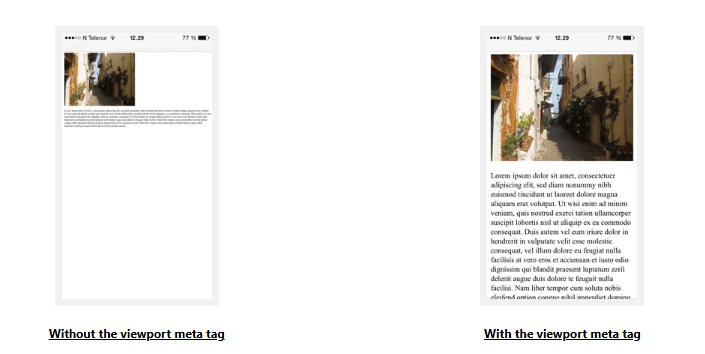
<meta name="viewport" content="width=device-width, initial-scale=1.0">This gives the browser instructions on how to control the page's dimensions and scaling.
The width=device-width part sets the width of the page to follow the screen-width of the device (which will vary depending on the device).
The initial-scale=1.0 part sets the initial zoom level when the page is first loaded by the browser.
Here is an example of a web page without the viewport meta tag, and the same web page with the viewport meta tag:
The HTML <script> Element
<script> উপাদানটি ক্লায়েন্ট-সাইড জাভাস্ক্রিপ্ট সংজ্ঞায়িত করতে ব্যবহৃত হয়।
The following JavaScript writes "Hello JavaScript!" into an HTML element with id="demo":
Example
<script>
function myFunction() {
  document.getElementById("demo").innerHTML = "Hello JavaScript!";
}
</script>
Tip:
To learn all about JavaScript, visit our JavaScript Tutorial.
The HTML <base> Element
<base> উপাদানটি একটি পৃষ্ঠায় সমস্ত নির্ভরশীল URL-এর জন্য ভিত্তি URL এবং/অথবা গন্তব্য নির্দিষ্ট করে।
<base> tag must have either an href or a target attribute present, or both.
There can only be one single <base> element in a document!
Example
Specify a default URL and a default target for all links on a page:

<head>
<base href="https://www.jassifteam.com/" target="_blank">
</head>

<body>
<img src="images/stickman.gif" width="24" height="39" alt="Stickman">
<a href="tags/tag_base.asp">HTML base Tag</a>
</body>
Chapter Summary
- <head> উপাদানটি মেটাডেটার জন্য একটি ধারক (ডেটা সম্পর্কে ডেটা)।
- <head> উপাদানটি <html> ট্যাগ এবং <body> ট্যাগের মধ্যে স্থাপন করা হয়
- <title> উপাদান প্রয়োজন এবং নথির শিরোনাম সংজ্ঞায়িত করে
- <style> উপাদানটি একটি একক নথির জন্য শৈলী তথ্য সংজ্ঞায়িত করতে ব্যবহৃত হয়
- <link> ট্যাগটি প্রায়ই বহিরাগত স্টাইল শীটগুলির সাথে লিঙ্ক করতে ব্যবহৃত হয়
- <meta> উপাদানটি সাধারণত নথির ফন্ট, পৃষ্ঠার বিবরণ, কীওয়ার্ড, লেখক এবং ভিউপোর্ট সেটিংস নির্দিষ্ট করতে ব্যবহৃত হয়
- <script> উপাদানটি ক্লায়েন্ট-সাইড জাভাস্ক্রিপ্ট সংজ্ঞায়িত করতে ব্যবহৃত হয়
- <base> উপাদানটি একটি পৃষ্ঠার সমস্ত নির্ভরশীল URL-এর জন্য ভিত্তি URL এবং/অথবা গন্তব্য নির্দিষ্ট করে
Exercise
❓ Which one of the following elements should NOT be placed in the head section?
HTML head Elements
| Tag | Description |
|---|---|
| <head> | Defines information about the document |
| <title> | Defines the title of a document |
| <base> | Defines a default address or a default target for all links on a page |
| <link> | Defines the relationship between a document and an external resource |
| <meta> | Defines metadata about an HTML document |
| <script> | Defines a client-side script |
| <style> | Defines style information for a document |
Tip:
For a complete list of all available HTML tags, visit our HTML Tag Reference.